How Rounding Changes Mortgage, Loan, Currency, and BMI Calculator Results
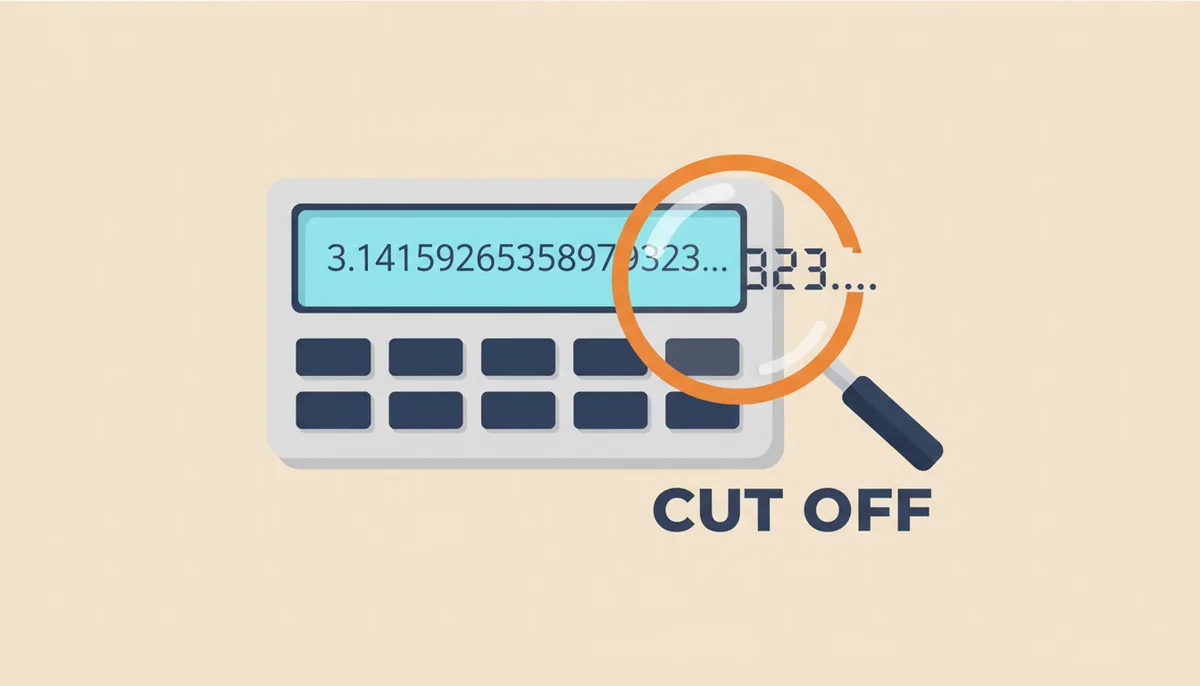
Why Don't My Numbers Match the Calculator's?
You punched the numbers into your calculator app, then checked them by hand. The monthly payment came out to $2,137.42 on the screen, but your math says $2,137.38. Four cents off. You try again, more carefully this time. Same gap.
This isn't an error—at least not the kind you're thinking of. What you're seeing is the cumulative effect of rounding, a mathematical necessity that occurs multiple times during complex calculations. Every calculator, from the one on your phone to the sophisticated tools banks use, must decide how to handle numbers that stretch beyond practical limits.
The impact varies by context. In financial calculations like mortgages and loans, tiny rounding differences compound over hundreds of payments, potentially adding up to real money. For health metrics like BMI, rounding can push you across a classification boundary—the difference between "normal" and "overweight" might hinge on whether 24.96 becomes 24.9 or 25.0.
Understanding where and why rounding happens lets you distinguish between harmless computational artifacts and genuine errors that could affect major decisions. More importantly, it helps you know when those small differences matter and when they don't.
How Do Computers Handle Decimals? (The Hidden Math)
Computers don't think in decimal. They work in binary—ones and zeros. This fundamental mismatch between how we write numbers and how computers store them creates precision issues before any intentional rounding even begins. You can read a detailed explanation of these floating-point limitations in authoritative computer science references that explain why floating-point numbers have inherent precision limitations: why floating-point storage creates precision issues.
Take the number 0.1. Simple enough, right? One-tenth. But in binary, 0.1 becomes an infinitely repeating fraction, like trying to express one-third (0.333...) in decimal. The computer must cut it off somewhere. Under the IEEE 754 standard—the universal rulebook for how computers handle decimal numbers—0.1 actually gets stored as something closer to 0.10000000000000000555111512312578. IEEE 754 defines the formats and rounding behaviors used across most hardware and software.
Try this experiment: In any spreadsheet program, type =0.1+0.2 in a cell, then format that cell to show 17 decimal places. You won't see 0.3. You'll see 0.29999999999999999. This isn't a bug. It's the inevitable result of converting between number systems with different bases.
IEEE 754 defines several precision levels. Single precision uses 32 bits and gives you about 7 decimal digits of accuracy. Double precision uses 64 bits and gives you about 15 decimal digits. Most calculators use double precision, which is why they can handle numbers in the trillions while still tracking pennies—but not infinitely.
These binary representation limits mean that even before a calculator applies any rounding rules, it's already working with approximations. The monthly interest rate for a 6.875% annual rate divided by 12 isn't exactly 0.572916666... in the computer's memory. It's the closest value that can be represented in binary floating-point format.
What Are the Different Rules for Rounding?
Once a calculation produces more digits than needed, the calculator must decide which way to round. Different methods exist because different situations demand different approaches to fairness and accuracy.
The method you learned in school—round 5 up—seems straightforward. But apply it thousands of times, and you'll systematically inflate your totals. That's why financial systems often use "round half to even," also called banker's rounding. When the digit to be rounded is exactly 5, this method rounds to the nearest even number. So 2.5 becomes 2, but 3.5 becomes 4.
Truncation takes the simplest approach: just chop off the extra digits. No rounding at all. If you're calculating to two decimal places, 2.7894 becomes 2.78. Period. This method always rounds down, creating its own bias.
| Method Name | Rule | 2.5 becomes | 3.5 becomes | Bias | Common Use Case |
|---|---|---|---|---|---|
| Round Half Up | 5 or higher rounds up | 3 | 4 | Tends to inflate totals over time | Everyday math, retail pricing |
| Round Half to Even | 5 rounds to nearest even | 2 | 4 | Minimizes cumulative bias | Financial data processing, statistics |
| Truncation | Simply cut off extra digits | 2 | 3 | Always rounds down | Floor functions, age calculations |
| Round Half Down | 5 or lower rounds down | 2 | 3 | Tends to deflate totals over time | Rare, some inventory systems |
The bias matters when you're summing many rounded values. Imagine processing a million transactions that each end in .5 cents. Round half up adds $5,000 to your total compared to truncation. Banker's rounding splits the difference, sending half the .5 values up and half down, assuming they're evenly distributed between odd and even numbers.
Where Does Rounding Happen in a Mortgage Calculation?
A mortgage calculation involves multiple steps where rounding can occur, each potentially affecting your final payment amount. Let's trace through the standard calculation to see where these rounding points hide.
Start with a $400,000 loan at 6.75% annual interest for 30 years. The first rounding happens immediately: converting the annual rate to monthly. Divide 6.75% by 12, and you get 0.5625%—clean and exact. But many rates don't divide so neatly. A 6.875% annual rate becomes 0.5729166666...% monthly. The calculator must decide how many digits to keep.
This fractional monthly rate feeds into the payment formula: M = P[r(1+r)^n]/[(1+r)^n-1], where P is principal, r is monthly rate, and n is number of payments. Even with clean inputs, this formula generates irrational numbers. The calculator performs dozens of multiplication and division operations, each potentially introducing tiny errors that compound.
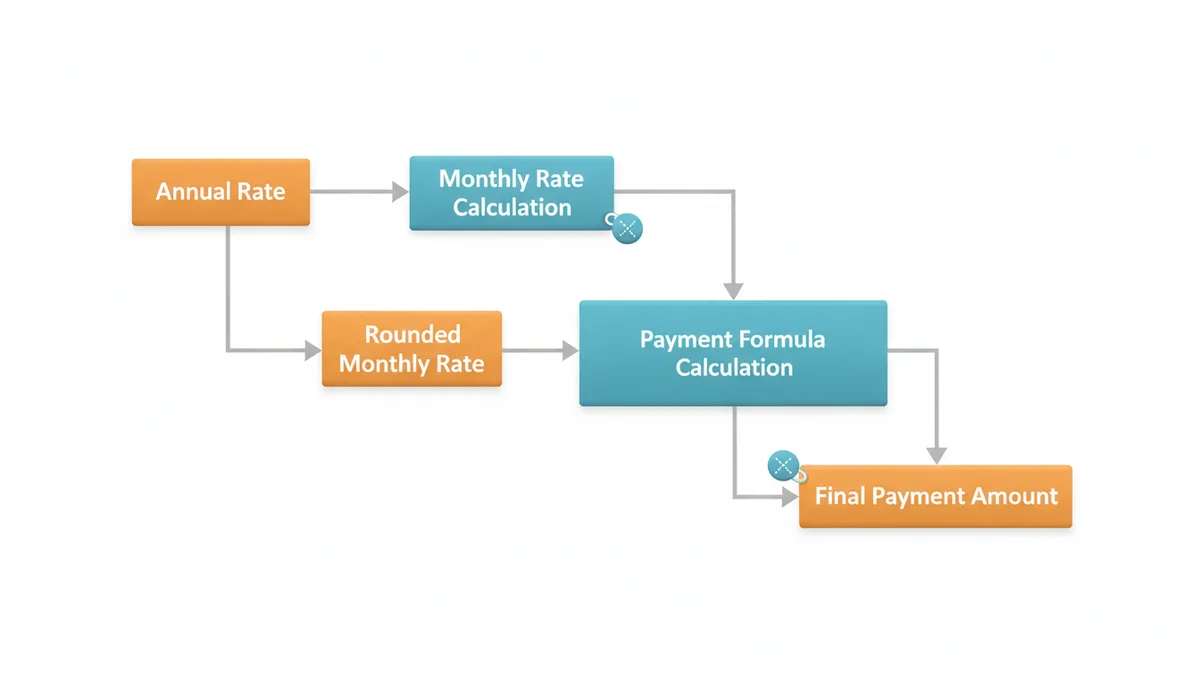
The second critical rounding point comes at the end: converting the raw calculated payment to dollars and cents. If the formula produces $2,137.4234567, the calculator must round to $2,137.42. This might seem trivial, but over 360 payments, being off by half a cent per month means a $1.80 discrepancy in total interest paid.
Banks handle this by adjusting the final payment. They use the rounded monthly payment for 359 payments, then calculate exactly what remains for payment 360. This is why your last mortgage payment is almost never the same as the others—it absorbs all the accumulated rounding differences.
How Much Can Rounding Really Cost on a Loan?
Let's quantify the real-world impact using that $400,000 mortgage at 6.875% for 30 years. The exact monthly interest rate is 0.00572916666... (repeating). But calculators and lending systems must round this at some point.
Here's the precise calculation. Using the formula M = P[r(1+r)^n]/[(1+r)^n-1] where P = $400,000, n = 360 months, and r = 0.00572916666... (keeping full precision), the exact monthly payment is $2,631.025846. Round this to cents, and you get $2,631.03.
Now let's see what happens when we round the monthly rate before calculating. Round to 8 decimal places (r = 0.00572917), and the monthly payment becomes $2,631.026089, which rounds to $2,631.03—identical to our full-precision result. But round the rate to just 4 decimal places (r = 0.0057), and the payment calculates to $2,619.14. That's a difference of $11.89 per month, or $4,280.40 over the life of the loan.
The real protection comes from regulations. The Consumer Financial Protection Bureau's Regulation Z allows specific tolerances for disclosed APRs and finance charges. For a regular mortgage, the APR can be considered accurate if it's within 0.125% of the actual rate. For irregular transactions, the tolerance rises to 0.25%. These rules acknowledge that perfect precision is impossible while ensuring consumers aren't misled by significant computational differences. See the official regulations for details: Consumer Financial Protection Bureau regulations.
Financial institutions typically use at least 10 decimal places for intermediate calculations to minimize these effects. They also follow consistent rounding rules throughout the life of the loan. If you're comparing offers from different lenders, a few dollars difference in the monthly payment calculation is normal and acceptable. Focus instead on the APR, total interest cost, and fees—these swamp any rounding effects.
How Does Rounding Affect Currency Exchange Calculations?
Currency exchange adds another layer of complexity because different currencies have different smallest units. The US dollar divides into 100 cents. The Japanese yen has no subdivision at all. Some currencies, like the Kuwaiti dinar, divide into 1,000 fils.
Exchange rates themselves often extend to 5 or 6 decimal places. Today's EUR/USD rate might be 1.05847. But when you exchange €500, the resulting $529.235 must be rounded to $529.24 for any practical transaction. That's standard rounding for USD—to the nearest cent.
The complexity multiplies when converting between currencies with different decimal conventions. Converting $100 USD to Japanese yen at a rate of 149.73 gives ¥14,973—no rounding needed because yen uses no decimal places. But converting ¥10,000 back to USD at the inverse rate yields $66.78641..., which rounds to $66.79.
| Currency Name | ISO Code | Minor Unit | Decimal Places | Special Rules |
|---|---|---|---|---|
| US Dollar | USD | Cent | 2 | Standard rounding to nearest cent |
| Euro | EUR | Cent | 2 | Standard rounding to nearest cent |
| Japanese Yen | JPY | None | 0 | Always whole numbers |
| Swiss Franc | CHF | Rappen | 2 | Cash rounds to nearest 0.05 |
| Kuwaiti Dinar | KWD | Fils | 3 | Uses 3 decimal places |
| Bitcoin | BTC | Satoshi | 8 | Can use up to 8 decimal places |
For travelers and small transactions, these rounding differences pale compared to the spread—the difference between buy and sell rates—that exchange services charge. If the "true" mid-market rate is 1.05847, a typical airport exchange might buy euros at 1.10 and sell at 1.01. That 4-5% spread dwarfs any rounding considerations.
Professional traders and financial systems follow ISO 4217 standards for currency decimal places and use consistent rounding rules (typically banker's rounding) to prevent systematic bias across millions of transactions. For consumers, the key is understanding that seeing slightly different results from different currency calculators is normal—what matters is that they're using current rates and clearly showing any fees.
When Does Rounding Change a BMI or Health Result?
Unlike financial calculations where rounding creates cumulative effects over time, BMI rounding matters most at classification boundaries. The difference between a BMI of 24.9 and 25.0 isn't just one decimal place—it's the line between "normal weight" and "overweight" according to WHO and CDC guidelines.
Consider someone who is 5'9" (175.26 cm) and weighs 168 pounds (76.20 kg). The precise BMI calculation yields 24.86. Round to one decimal place, and they're classified as normal weight (24.9). But gain just one pound to 169 pounds (76.66 kg), and the BMI becomes 24.96, which rounds to 25.0—suddenly crossing into the "overweight" category. The actual weight difference is minimal, but the classification changes.
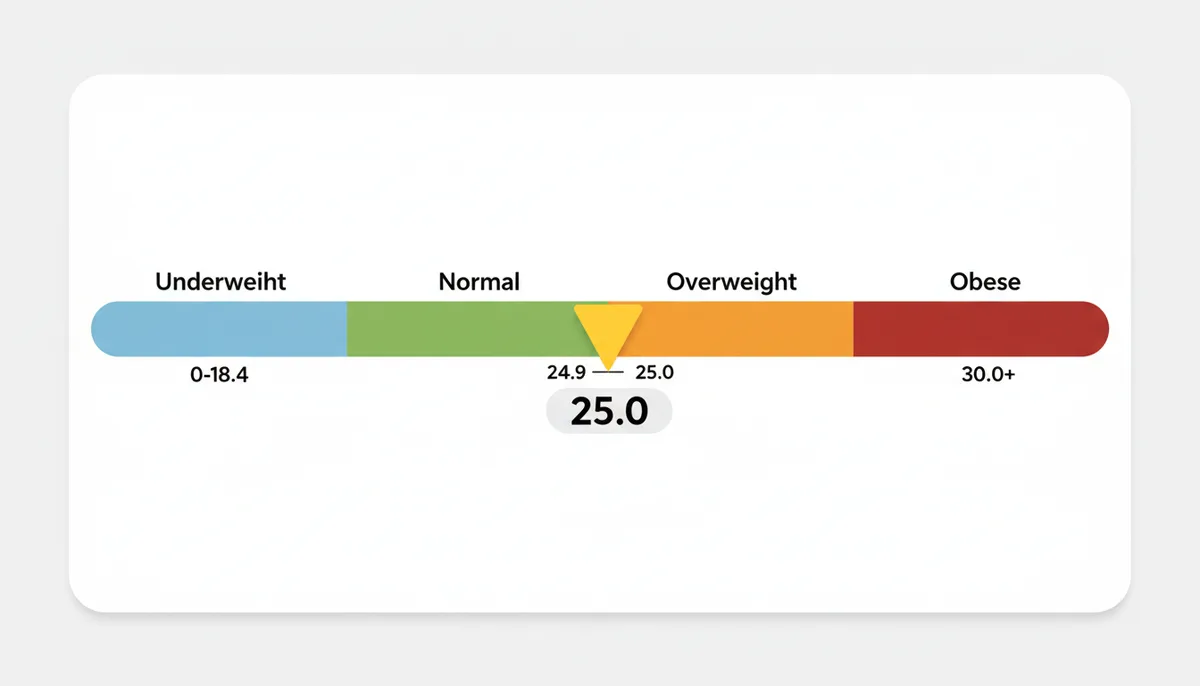
The precision of your input measurements often matters more than the final rounding. Standing on a bathroom scale in the morning versus evening can show a 2-3 pound difference. That's a full BMI point for someone of average height. Height measurements vary too—posture, time of day, and whether you're wearing shoes all affect the reading.
Medical professionals understand these limitations. That's why BMI serves as a screening tool, not a diagnosis. They look at trends over time, waist circumference, body composition, and other health markers. A BMI hovering around 25 triggers a broader conversation about health, not a rigid classification based on whether it rounds up or down.
For personal tracking, consistency matters more than precision. Use the same scale, measure at the same time of day, and track the trend rather than obsessing over decimal places. If your BMI calculations consistently yield values between 24.5 and 25.5, you're in a borderline zone where lifestyle factors—diet quality, exercise habits, stress levels—matter far more than whether today's number rounds to 24 or 25.
How to Check if a Calculator's Result Is Reliable
When you suspect a calculator's result might be wrong, start with the most common source of error: your inputs. A mortgage calculator expecting an annual interest rate will give wildly different results if you accidentally enter the monthly rate. BMI calculators need to know whether you're using pounds or kilograms, inches or centimeters.
Next, verify your result against a second source. Government agencies and major financial institutions offer calculators that follow industry standards. The CFPB's mortgage calculator, for instance, uses the same formulas banks use. If two reputable calculators give slightly different results—within a few dollars for a mortgage payment or 0.1 for BMI—you're seeing normal rounding variation, not an error.
Perform a reality check with simplified numbers. For a mortgage, use round figures: $100,000 at 6% for 30 years should give you a payment around $600. For currency exchange, €100 at a rate of 1.10 should give you about $110. These ballpark figures help you spot order-of-magnitude errors that indicate a real problem versus minor rounding differences.
Watch for calculators that display excessive precision as a sign of accuracy. Showing a monthly payment as $2,137.4285739 doesn't make the calculation more accurate—it suggests the developer doesn't understand that cents are the practical limit for currency. A properly designed financial calculator rounds to cents. A good BMI calculator rounds to one decimal place.
Document your inputs and results when making important decisions. Screenshot the calculator showing your entries and the result. This protects you if questions arise later and helps you verify that you entered the correct values. For major financial decisions, cross-check calculator results with official loan estimates or professional advice.
Remember that perfect agreement between calculators is neither expected nor necessary. A mortgage payment difference of a few dollars, a currency conversion off by a few cents, or a BMI that varies by 0.1 between calculators—these are normal computational realities, not errors. Focus on understanding the bigger picture: the total cost of the loan, the effective exchange rate after fees, or whether your BMI trend is moving in a healthy direction.
The Real Cost of Floating-Point Errors in Compound Interest
Compound interest calculations amplify tiny errors in ways that simple interest doesn't. Each period's interest calculation depends on the previous period's balance, which may already contain rounding errors. These errors don't just add up—they compound.
Take a retirement account with $50,000 earning 7.2% annually, compounded monthly. The precise monthly rate is 0.006 (0.072/12). Clean number, no rounding needed. After 30 years, using the compound interest formula A = P(1+r)^n, you'd have $423,895.84.
But many real rates aren't so clean. Change that to 7.25% annually, and the monthly rate becomes 0.00604166666... Now you must round. Round to 5 decimal places (0.00604), and after 30 years you have $425,388.92. Round to 8 decimal places (0.00604167), and you get $426,997.78. That's a $1,609 difference—real money lost to rounding in intermediate calculations.
The error grows exponentially with time. After 10 years, the difference between 5-digit and 8-digit precision is only $59. After 20 years, it's $393. By year 30, it's quadrupled to $1,609. For a 40-year investment horizon, the gap exceeds $5,000.
This is why financial institutions use extended precision internally. The Federal Reserve's regulations specify that Truth in Lending calculations must use at least 5 decimal places for periodic rates, but most banks use 10 or more. They know that even tiny errors in the rate cascade through thousands of compound calculations.
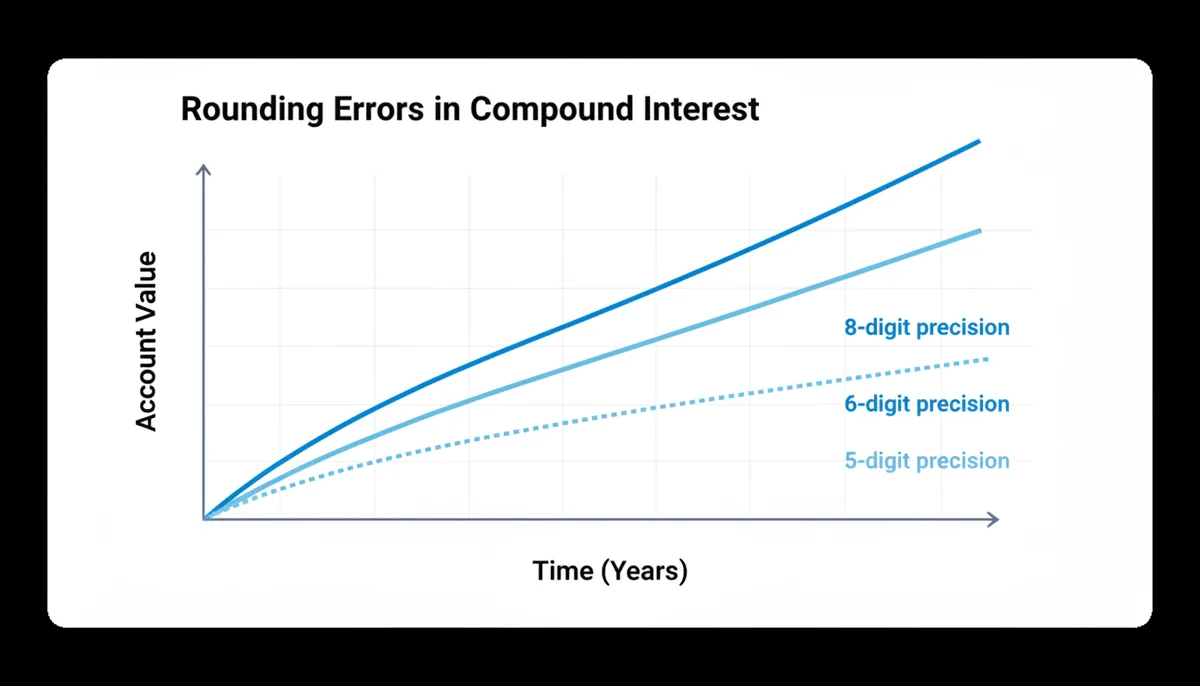
The problem intensifies with daily compounding. Credit cards typically compound interest daily using a rate of APR/365. For a 23.99% APR card, that's 0.0657260274% per day—already requiring rounding. Over a year, different rounding precisions can change the effective APR by 0.1% or more, affecting minimum payments and payoff calculations.
You can minimize these errors in your own calculations by keeping intermediate values at full precision and only rounding the final result. In spreadsheets, avoid rounding within formulas. Instead of =ROUND(A1/12,5), calculate =A1/12 and let the spreadsheet maintain internal precision. Only round when displaying final dollar amounts.
When Unit Conversion Meets Rounding: The Mars Climate Orbiter Problem
Unit conversion errors become more dangerous when combined with rounding, as seemingly precise numbers can mask fundamental mistakes. While the Mars Climate Orbiter was lost due to a unit mismatch—not rounding—the incident illustrates how numerical precision can create false confidence.
This pattern appears in everyday calculators. Enter your height as "6.2" thinking it means 6'2", and a BMI calculator interpreting it as 6.2 feet (6'2.4") will be off by nearly half an inch. Enter a 6.5% interest rate as "6.5" into a mortgage calculator expecting a decimal (0.065), and you'll get a monthly payment 100 times too high—yet the number might still look plausible at first glance.
Modern calculators try to prevent these errors through range checking and unit labels. But precision can still deceive. When converting between metric and imperial, each conversion step can introduce rounding. Convert 100 kg to pounds: 100 × 2.20462 = 220.462 pounds. Round to 220 pounds. Convert back: 220 ÷ 2.20462 = 99.79 kg. You've lost 0.21 kg (about 7 ounces) through round-trip conversion.
The lesson: verify units before trusting precision. When a calculator gives you an unexpectedly precise result, check whether you've entered values in the expected format. A mortgage payment calculated to the penny makes sense; one showing fractional cents suggests a unit or percentage format error. Real measurements have natural precision limits—money to cents, weight to ounces, height to quarter-inches. Results beyond these limits warrant double-checking your inputs.
How Different Countries' Tax Rounding Rules Create Payment Gaps
Tax calculations reveal how different rounding rules in the same transaction can create systematic discrepancies. When tax rates meet currency rounding, the interaction produces gaps that businesses and tax authorities handle in surprisingly different ways.
In the United States, sales tax gets calculated on the total, then rounded. Buy three items at $9.99 each in a location with 8.875% tax: subtotal $29.97, tax $2.66, total $32.63. But some point-of-sale systems calculate tax per item: $9.99 × 1.08875 = $10.88, rounded to $10.88 per item, total $32.64. One penny different.
The European Union's VAT system adds another layer. VAT gets included in the displayed price, but businesses must calculate the tax portion for reporting. An item priced at €10.00 including 19% VAT contains €8.40 of product and €1.60 of tax—except that €10.00 ÷ 1.19 actually equals €8.403361..., which rounds to €8.40. Over thousands of transactions, these fractions matter.
Japan's consumption tax system demonstrates extreme precision. The 10% tax rate seems simple, but businesses can choose between two calculation methods: the "invoice method" (calculating tax on each line item) or the "account book method" (calculating on the total). Different methods plus different rounding approaches—truncation versus rounding—can create gaps of several yen per transaction.
| Country | Tax System | Rounding Rule | Calculated On | Potential Gap Source |
|---|---|---|---|---|
| United States | Sales Tax | Round to cent | Total or per item | Method inconsistency |
| Germany | VAT (19%) | Round to cent | Tax-inclusive price | Reverse calculation |
| Japan | Consumption Tax | Truncate or round | Choice of method | Business discretion |
| Canada | GST/HST | Round to cent | Subtotal | Provincial combinations |
These gaps matter for businesses reconciling thousands of transactions. A retailer processing 10,000 transactions monthly might see $30-50 in rounding discrepancies between their point-of-sale system and accounting software. Not fraud, not error—just different moments of rounding.
Tax authorities recognize this reality. The IRS allows taxpayers to round to whole dollars on returns. The German Finanzamt accepts either mathematical rounding or commercial rounding for VAT calculations. These allowances acknowledge that perfect precision across different systems is impossible.
For individuals, this means your receipt might legitimately differ from your credit card statement by a penny, especially for online purchases where the merchant and payment processor might apply tax rounding at different stages. Keep receipts for large purchases, but don't waste time tracking down every penny discrepancy—it's likely just different systems following different valid rounding rules.
Frequently Asked Questions
Is a calculator that shows more decimal places more accurate?
Not necessarily. The internal precision used for calculations matters more than the number of decimals displayed in the final answer. A properly rounded two-decimal-place result is often more correct and useful than a final result with ten-plus decimals. Excessive decimal places in a final answer often indicate the developer doesn't understand the practical limits of the measurement. Money has cents, not fractions of cents. BMI categories work with one decimal place. Showing more precision than the real-world application uses is misleading, not helpful.
Can I tell a calculator which rounding method to use?
Almost never. The rounding method is an integral part of the calculator's programming, chosen to comply with financial or scientific standards. The user controls the inputs, not the internal calculation logic. Professional financial calculators use banker's rounding to minimize systematic bias. Scientific calculators follow IEEE standards. These choices are made to ensure consistency and fairness across millions of calculations. What you can control is choosing calculators from reputable sources that follow industry standards.
My official mortgage statement differs slightly from the online calculator. Why?
This is likely because the bank's official calculation includes costs not in the simple calculator, such as property taxes, homeowner's insurance (PITI), mortgage insurance, or specific interest calculations based on the closing date. Banks also calculate interest daily based on the exact number of days in each month, while simple calculators often assume equal monthly periods. Additionally, your first payment might be adjusted for the partial month between closing and your first full payment date. These real-world adjustments typically create larger differences than computational rounding.
Does this rounding issue also happen in spreadsheets like Excel or Google Sheets?
Yes, spreadsheet programs also use IEEE 754 floating-point math and are subject to the same tiny precision and rounding behaviors. You can often see these effects by formatting a cell to display 15 or more decimal places. Try entering =0.1+0.2-0.3 in a cell and formatting it to show 17 decimal places—you won't see exactly zero. Spreadsheets offer functions like ROUND, ROUNDUP, and ROUNDDOWN to give you explicit control over rounding when needed. For financial models, always round currency values to appropriate decimal places rather than carrying full precision throughout.
For currency exchange, isn't the constantly changing rate more important than rounding?
Yes, absolutely. For any personal or typical business transaction, the real-time rate fluctuation and the fee or spread charged by the exchange service will have a far greater financial impact than the final rounding to the nearest cent. Exchange rates can move 1-2% in a single day during normal conditions and much more during major economic events. Meanwhile, the typical spread at consumer exchange services runs 2-4%, and credit card foreign transaction fees add another 1-3%. These factors dwarf the impact of rounding a few cents on the final amount.
If my BMI is calculated at 24.9, should I be worried that I'm almost 'overweight'?
BMI is a screening tool, not a diagnosis. Being near a threshold is a good reason to consider other health factors like diet, exercise, and waist circumference, rather than focusing on the single, rounded BMI number. Many athletes with high muscle mass register as "overweight" by BMI despite being in excellent health. Conversely, someone with a "normal" BMI might have poor cardiovascular fitness or excessive visceral fat. Use BMI as one data point among many. If you're near a boundary, focus on healthy habits rather than moving the number by a few decimal places.
Sources
- IEEE Standards Association — The existence and purpose of the IEEE 754 standard for floating-point arithmetic, which governs how computers handle decimal calculations.
- Consumer Financial Protection Bureau (CFPB) — Information on Regulation Z (Truth in Lending Act), which sets the legal tolerances for disclosing APR and other financial charges on loans, acknowledging minor calculation variations.
- International Organization for Standardization (ISO) — The ISO 4217 standard, which defines world currency codes and specifies their decimal subdivisions (minor units), forming the basis for currency rounding rules.
- World Health Organization (WHO) — The standard international classification categories for Body Mass Index (BMI), including the specific threshold values (18.5, 25.0, 30.0) that make rounding significant.
- Centers for Disease Control and Prevention (CDC) — Guidelines on calculating and interpreting BMI for adults, including the formulas for imperial and metric units and the standard weight status categories.
- Oracle (publisher of 'What Every Computer Scientist Should Know About Floating-Point Arithmetic') — The authoritative, in-depth explanation of why floating-point numbers have inherent precision limitations in binary, backing the claims in the 'How Computers Handle Decimals' section.